
The Tags section shows all existing tags.
Tags
to Manage your connected products,
interactive locations.
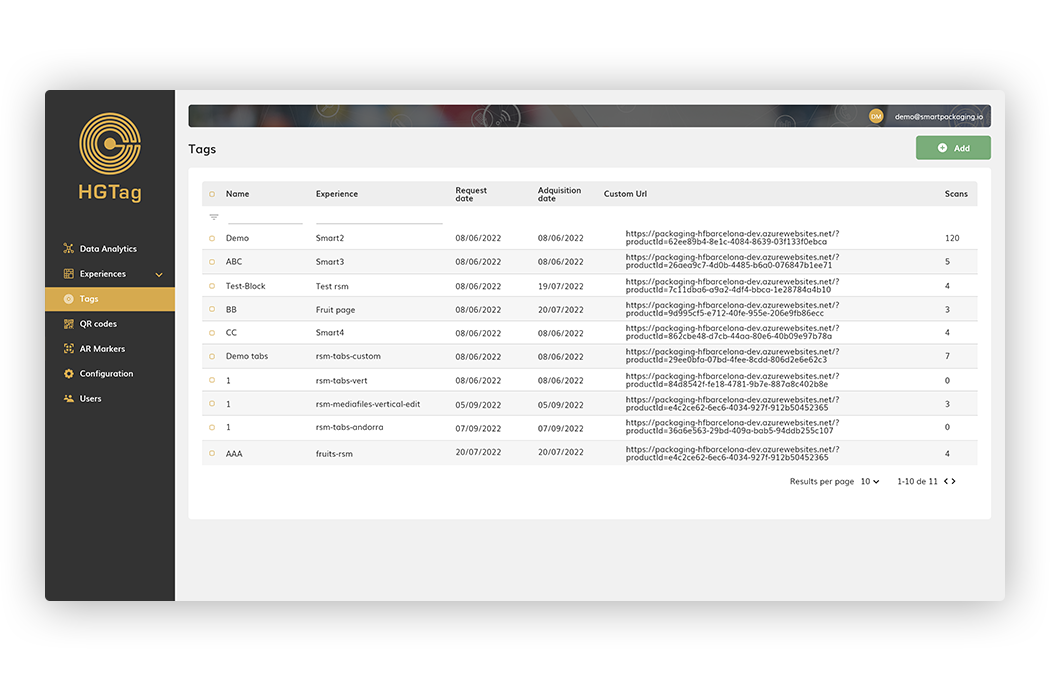
By default, 10 tags are displayed per page, being able to move to another page or modify the display per page from the dropdown arrows on the bottom right of the page.
From the list you can filter the data from the UUID or Experience column.
The columns in the list are:
• UUID: Unique Identifier of the tag.
• Experience: experience with which the tag is associated
• Request Date: The date the tag was created.
• Acquisition Date: Date on which we link the tag with the UUID sent to us by the provider that has encoded the chip.
• Custom URL: Custom URL of the experience.
• Scans: Number of scans that the tag has had.
Creating/deleting tags
For the creation or deletion of tags, please contact the HTAG support department, which is in charge of all tag management. Their e-mail address is: support@hgtag.io
How can we help?
If you have more questions you can access the different Tutorials available in this help, the Documentation or our FAQS.